Payouts from a settlement account with our widget or by token
You can make payouts from a settlement account to bank accounts using a token instead of the account number. You can get the token as follows:
- With our widget
- By token
Step 1. Get a public token
A public token is required to initialize the widget. Send a request to Bank 131 to create a token (token), specifying the widget type as tokenize_widget. The response will contain your public token.
Example of getting a public token
curl -X POST \
  https://demo.bank131.ru/api/v1/token \
  -H 'Content-Type: application/json' \
  -H 'X-PARTNER-PROJECT: your_project_name' \
  -H 'X-PARTNER-SIGN: signature' \
  -d '{
    "tokenize_widget": {
      "access": true
    }
  }'
Step 2. Initialize the widget on your site
Initialize the widget on your site using the public token obtained in the previous step.
The payout recipient can then enter their bank card number into the data collection form.
Step 3. Create a payment session
Create a session using the session/create/rko method. You will receive the payment session identifier in response. You will need it in the subsequent steps.
Alternatively, you can use the
session/init/payout/rkomethod to create a session and a payout at the same time. In this case, specify all the parameters for a payout right away and skip the next step. This option is not recommended.
Creating a session
curl -X POST \
  https://demo.bank131.ru/api/v1/session/create/rko \
  -H 'Content-Type: application/json' \
  -H 'X-PARTNER-PROJECT: your_project_name' \
  -H 'X-PARTNER-SIGN: signature' \
  -d '{
    "metadata": "good"
  }'
Step 4. Start the payout
Start the payout using the session/start/payout/rko method. Pass the session identifier along with all the parameters for a payout.
You can find information on the token or account through the token/info method. For example, you can get the first 5 or the last 4 digits of the account number to show the recipient which account the payout will be made to.
Payout example with the widget
- To individuals
- To legal entities
curl -X POST \
  https://demo.bank131.ru/api/v1/session/start/payout/rko \
  -H 'Content-Type: application/json' \
  -H 'X-PARTNER-PROJECT: your_project_name' \
  -H 'X-PARTNER-SIGN: signature' \
  -d '{
    "session_id": "ps_2643",
    "payment_method": {
      "type": "bank_account",
      "bank_account": {
        "ru": {
          "token": "3f03ee2580046153bb0aa859558e7ada10d3835270fdb4c4b70961239d37f31d",
          "full_name": "Ivanov Ivan Ivanovich",
          "description": "Wire for agreement № 5015553111 Ivanov Ivan Ivanovich VAT exempt"
        },
        "system_type": "ru"
      }
    },
    "amount_details": {
      "amount": 300000,
      "currency": "rub"
    },
    "participant_details": {
      "sender": {
        "account": "40702810300200000013"
      }
    }
  }'
curl -X POST \
  https://demo.bank131.ru/api/v1/session/start/payout/rko \
  -H 'Content-Type: application/json' \
  -H 'X-PARTNER-PROJECT: your_project_name' \
  -H 'X-PARTNER-SIGN: signature' \
  -d '{
    "session_id": "ps_2643",
    "payment_method": {
      "type": "bank_account",
      "bank_account": {
        "ru": {
          "token": "3f03ee2580046153bb0aa859558e7ada10d3835270fdb4c4b70961239d37f31d",
          "full_name": "Vector LLC",
          "description": "Transfer of funds under the agreement for December 2025. VAT exempt"
        },
        "system_type": "ru"
      }
    },
    "amount_details": {
      "amount": 300000,
      "currency": "rub"
    },
    "participant_details": {
      "sender": {
        "account": "40702810300200000013"
      }
    }
  }'
Step 5. Wait for a webhook saying the payout is ready
Bank 131 will send you a ready_to_confirm webhook. This means that the payout can be performed and the Bank is waiting for you to confirm or cancel.
The webhook body will contain the confirm_information object. Save it, as you will need this object to confirm or cancel the transaction.
Webhook example
curl -X POST \
  https://partner.ru \
  -H 'content-type: application/json' \
  -H 'X-PARTNER-SIGN: signature' \
  -d '{
    "type": "ready_to_confirm",
    "session": {
      "id": "ps_2643",
      "status": "in_progress",
      "created_at": "2025-02-20T08:42:35.905869Z",
      "updated_at": "2025-02-20T08:42:36.382627Z",
      "payments": [{
        "id": "po_513",
        "status": "pending",
        "created_at": "2025-02-20T08:42:35.965210Z",
        "payment_method": {
          "type": "bank_account",
          "bank_account": {
            "system_type": "ru",
            "ru": {
              "token": "3f03ee2580046153bb0aa859558e7ada10d3835270fdb4c4b70961239d37f31d",
              "full_name": "Vector LLC",
              "description": "Transfer of funds under the agreement for December 2025. VAT exempt"
            }
          }
        },
        "amount_details": {
          "amount": 300000,
          "currency": "RUB"
        },
        "paymentMetadata": {},
        "participant_details": {
          "sender": {
            "account": "40702810300200000013"
          }
        }
      }],
      "next_action": "confirm",
      "session_metadata": {}
    },
    "confirm_information": {
      "account_details": {
        "sender": {
          "account_number": "40702810300200000013",
          "name": "ABC LLC",
          "bank_name": "Bank 131",
          "bik": "049205131",
          "correspondent_account_number": "30101810822029205131",
          "inn": "3316004790",
          "kpp": "156667101"
        },
        "recipient": {
          "account_number": "40702810500000000001",
          "name": "Vector LLC",
          "bank_name": "Bank 131",
          "bik": "044525974",
          "correspondent_account_number": "30101810822000000974",
          "inn": "1111111111",
          "kpp": "156605101"
        }
      }
    }
  }'
Step 6. Confirm or cancel the payout
Check the payout details and confirm (session/confirm) or cancel (session/cancel) the payout passing the confirm_information object.
Confirming the session
curl -X POST \
  https://demo.bank131.ru/api/v1/session/confirm \
  -H 'Content-Type: application/json' \
  -H 'X-PARTNER-PROJECT: your_project_name' \
  -H 'X-PARTNER-SIGN: signature' \
  -d '{
    "session_id": "ps_2643",
    "confirm_information": {
      "account_details": {
        "sender": {
          "account_number": "40702810300200000013",
          "name": "ABC LLC",
          "bank_name": "Bank 131",
          "bik": "049205131",
          "correspondent_account_number": "30101810822029205131",
          "inn": "3316004790",
          "kpp": "156667101"
        },
        "recipient": {
          "account_number": "40702810500000000001",
          "name": "Vector LLC",
          "bank_name": "Bank 131",
          "bik": "044525974",
          "correspondent_account_number": "30101810822000000974",
          "inn": "1111111111",
          "kpp": "156605101"
        }
      }
    }
  }'
Canceling the session
curl -X POST \
  https://demo.bank131.ru/api/v1/session/cancel \
  -H 'Content-Type: application/json' \
  -H 'X-PARTNER-PROJECT: your_project_name' \
  -H 'X-PARTNER-SIGN: signature' \
  -d '{
    "session_id": "ps_2643",
    "confirm_information": {
      "account_details": {
        "sender": {
          "account_number": "40702810300200000013",
          "name": "ABC LLC",
          "bank_name": "Bank 131",
          "bik": "049205131",
          "correspondent_account_number": "30101810822029205131",
          "inn": "3316004790",
          "kpp": "156667101"
        },
        "recipient": {
          "account_number": "40702810500000000001",
          "name": "Vector LLC",
          "bank_name": "Bank 131",
          "bik": "044525974",
          "correspondent_account_number": "30101810822000000974",
          "inn": "1111111111",
          "kpp": "156605101"
        }
      }
    }
  }'
Step 7. Wait for a webhook with the payout results
Bank 131 will send you a payment_finished webhook. The result of the payout can be found in the status field of the payments/payout_list array.
If the status is succeeded, then the payout was successful. If the status is failed, then an error occurred during the payout.
Step 1. Create a payment session
Create a session using the session/create/rko method. You will receive the payment session identifier in response. You will need it in the subsequent steps.
Alternatively, you can use the
session/init/payout/rkomethod to create a session and a payout at the same time. In this case, specify all the parameters for a payout right away and skip the next step. This option is not recommended.
Creating a session
curl -X POST \
  https://demo.bank131.ru/api/v1/session/create/rko \
  -H 'Content-Type: application/json' \
  -H 'X-PARTNER-PROJECT: your_project_name' \
  -H 'X-PARTNER-SIGN: signature' \
  -d '{
    "metadata": "good"
  }'
Step 2. Start the payout
Start the payout using the session/start/payout/rko method. Pass the session identifier along with all the parameters for a payout.
You can find information on the token or account through the token/info method. For example, you can get the first 5 or the last 4 digits of the account number to show the recipient which account the payout will be made to.
Example of a payout by token
- To individuals
- To legal entities
curl -X POST \
  https://demo.bank131.ru/api/v1/session/start/payout/rko \
  -H 'Content-Type: application/json' \
  -H 'X-PARTNER-PROJECT: your_project_name' \
  -H 'X-PARTNER-SIGN: signature' \
  -d '{
    "session_id": "ps_2643",
    "payment_method": {
      "type": "bank_account",
      "bank_account": {
        "ru": {
          "token": "3f03ee2580046153bb0aa859558e7ada10d3835270fdb4c4b70961239d37f31d",
          "full_name": "Ivanov Ivan Ivanovich",
          "description": "Wire for agreement № 5015553111 Ivanov Ivan Ivanovich VAT exempt"
        },
        "system_type": "ru"
      }
    },
    "amount_details": {
      "amount": 300000,
      "currency": "rub"
    },
    "participant_details": {
      "sender": {
        "account": "40702810300200000013"
      }
    }
  }'
curl -X POST \
  https://demo.bank131.ru/api/v1/session/start/payout/rko \
  -H 'Content-Type: application/json' \
  -H 'X-PARTNER-PROJECT: your_project_name' \
  -H 'X-PARTNER-SIGN: signature' \
  -d '{
    "session_id": "ps_2643",
    "payment_method": {
      "type": "bank_account",
      "bank_account": {
        "ru": {
          "token": "3f03ee2580046153bb0aa859558e7ada10d3835270fdb4c4b70961239d37f31d",
          "full_name": "Vector LLC",
          "description": "Transfer of funds under the agreement for December 2025. VAT exempt"
        },
        "system_type": "ru"
      }
    },
    "amount_details": {
      "amount": 300000,
      "currency": "rub"
    },
    "participant_details": {
      "sender": {
        "account": "40702810300200000013"
      }
    }
  }'
Step 3. Wait for a webhook saying the payout is ready
Bank 131 will send you a ready_to_confirm webhook. This means that the payout can be performed and the Bank is waiting for you to confirm or cancel.
The webhook body will contain the confirm_information object. Save it, as you will need this object to confirm or cancel the transaction.
Webhook example
curl -X POST \
  https://partner.ru \
  -H 'content-type: application/json' \
  -H 'X-PARTNER-SIGN: signature' \
  -d '{
    "type": "ready_to_confirm",
    "session": {
      "id": "ps_2643",
      "status": "in_progress",
      "created_at": "2025-02-20T08:42:35.905869Z",
      "updated_at": "2025-02-20T08:42:36.382627Z",
      "payments": [{
        "id": "po_513",
        "status": "pending",
        "created_at": "2025-02-20T08:42:35.965210Z",
        "payment_method": {
          "type": "bank_account",
          "bank_account": {
            "system_type": "ru",
            "ru": {
              "token": "3f03ee2580046153bb0aa859558e7ada10d3835270fdb4c4b70961239d37f31d",
              "full_name": "Vector LLC",
              "description": "Transfer of funds under the agreement for December 2025. VAT exempt"
            }
          }
        },
        "amount_details": {
          "amount": 300000,
          "currency": "RUB"
        },
        "paymentMetadata": {},
        "participant_details": {
          "sender": {
            "account": "40702810300200000013"
          }
        }
      }],
      "next_action": "confirm",
      "session_metadata": {}
    },
    "confirm_information": {
      "account_details": {
        "sender": {
          "account_number": "40702810300200000013",
          "name": "ABC LLC",
          "bank_name": "Bank 131",
          "bik": "049205131",
          "correspondent_account_number": "30101810822029205131",
          "inn": "3316004790",
          "kpp": "156667101"
        },
        "recipient": {
          "account_number": "40702810500000000001",
          "name": "Vector LLC",
          "bank_name": "Bank 131",
          "bik": "044525974",
          "correspondent_account_number": "30101810822000000974",
          "inn": "1111111111",
          "kpp": "156605101"
        }
      }
    }
  }'
Step 4. Confirm or cancel the payout
Check the payout details and confirm (session/confirm) or cancel (session/cancel) the payout passing the confirm_information object.
Confirming the session
curl -X POST \
  https://demo.bank131.ru/api/v1/session/confirm \
  -H 'Content-Type: application/json' \
  -H 'X-PARTNER-PROJECT: your_project_name' \
  -H 'X-PARTNER-SIGN: signature' \
  -d '{
    "session_id": "ps_2643",
    "confirm_information": {
      "account_details": {
        "sender": {
          "account_number": "40702810300200000013",
          "name": "ABC LLC",
          "bank_name": "Bank 131",
          "bik": "049205131",
          "correspondent_account_number": "30101810822029205131",
          "inn": "3316004790",
          "kpp": "156667101"
        },
        "recipient": {
          "account_number": "40702810500000000001",
          "name": "Vector LLC",
          "bank_name": "Bank 131",
          "bik": "044525974",
          "correspondent_account_number": "30101810822000000974",
          "inn": "1111111111",
          "kpp": "156605101"
        }
      }
    }
  }'
Canceling the session
curl -X POST \
  https://demo.bank131.ru/api/v1/session/cancel \
  -H 'Content-Type: application/json' \
  -H 'X-PARTNER-PROJECT: your_project_name' \
  -H 'X-PARTNER-SIGN: signature' \
  -d '{
    "session_id": "ps_2643",
    "confirm_information": {
      "account_details": {
        "sender": {
          "account_number": "40702810300200000013",
          "name": "ABC LLC",
          "bank_name": "Bank 131",
          "bik": "049205131",
          "correspondent_account_number": "30101810822029205131",
          "inn": "3316004790",
          "kpp": "156667101"
        },
        "recipient": {
          "account_number": "40702810500000000001",
          "name": "Vector LLC",
          "bank_name": "Bank 131",
          "bik": "044525974",
          "correspondent_account_number": "30101810822000000974",
          "inn": "1111111111",
          "kpp": "156605101"
        }
      }
    }
  }'
Step 5. Wait for a webhook with the payout results
Bank 131 will send you a payment_finished webhook. The result of the payout can be found in the status field of the payments/payout_list array.
If the status is succeeded, then the payout was successful. If the status is failed, then an error occurred during the payout.
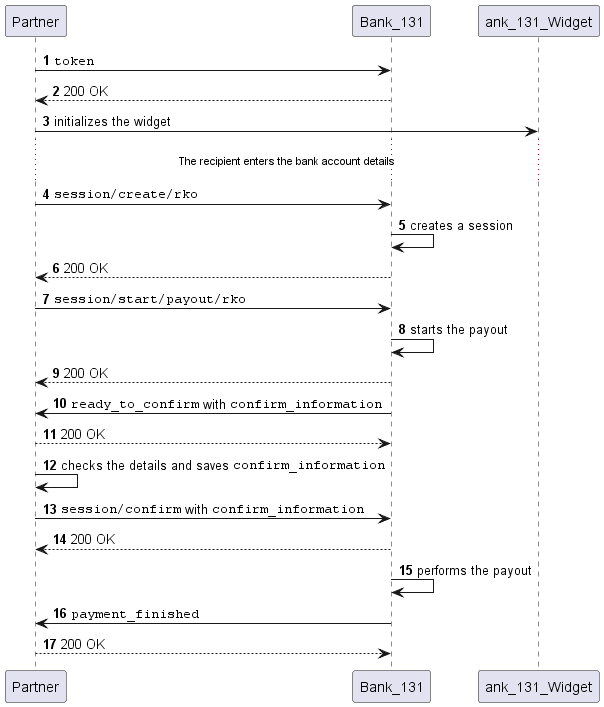
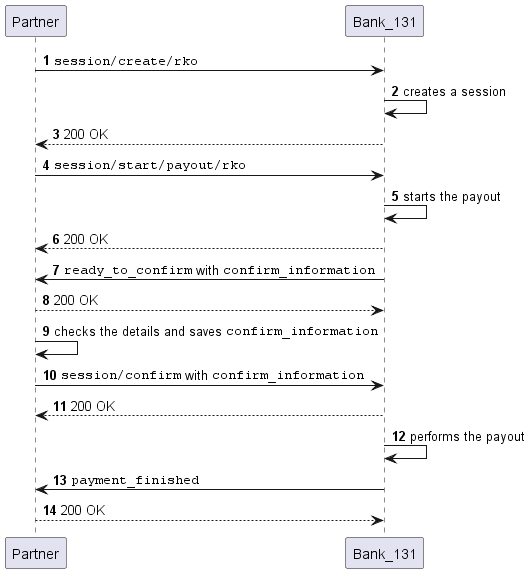
Sequence diagram
- With our widget
- By token
More about the payout statuses >
How to know if a payout is returned >