Payouts by card number
To make payouts by card number, you will need to comply with all the requirements of PCI DSS for this method.
Step 1. Create a payment session
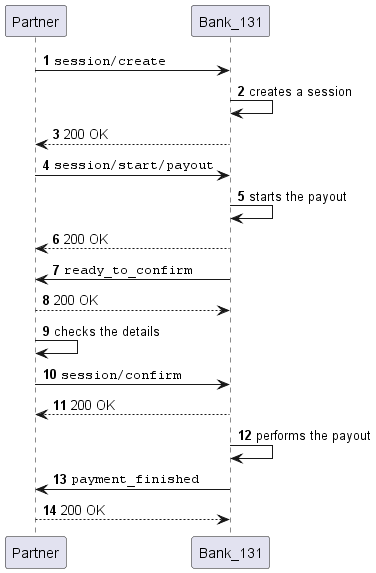
Create a session using the session/create method. You will
receive the payment session identifier in response. You will need it in the subsequent steps.
Alternatively, you can use the
session/init/payoutmethod to create a session and a payout at the same time. In this case, specify all the parameters for a payout right away and skip the next step. This option is not recommended.
Creating a session
- cURL
- PHP
curl -X POST \
  https://demo.bank131.ru/api/v1/session/create \
  -H 'Content-Type: application/json' \
  -H 'X-PARTNER-PROJECT: your_project_name' \
  -H 'X-PARTNER-SIGN: signature' \
  -d '{
    "metadata": "good"
  }'
use Bank131\SDK\API\Request\Builder\RequestBuilderFactory;
use Bank131\SDK\Client;
use Bank131\SDK\Config;

$config = new Config(
    'https://demo.bank131.ru',
    'your_project_name',
    file_get_contents('/path/to/your/private_key.pem')
);

$client = new Client($config);

$request = RequestBuilderFactory::create()
    ->createPayoutSession()
    ->setMetadata('good')
    ->build();

$response = $client->session()->create($request);
Step 2. Start the payout
Start the payout using the session/start/payout method. Pass the session identifier along with all the parameters for a payout.
Request example
- cURL
- PHP
curl -X POST \
  https://demo.bank131.ru/api/v1/session/start/payout \
  -H 'Content-Type: application/json' \
  -H 'X-PARTNER-PROJECT: your_project_name' \
  -H 'X-PARTNER-SIGN: signature' \
  -d '{
    "session_id": "ps_3230",
    "payment_method": {
      "type": "card",
      "card": {
        "type": "bank_card",
        "bank_card": {
          "number": "2200********4940"
        }
      }
    },
    "participant_details": {
      "recipient": {
        "full_name": "Ivanov Ivan Ivanovich"
      }
    },
    "amount_details": {
      "amount": 10000,
      "currency": "rub"
    },
    "metadata": "good"
  }'
use Bank131\SDK\API\Request\Builder\RequestBuilderFactory;
use Bank131\SDK\Client;
use Bank131\SDK\Config;
use Bank131\SDK\DTO\Card\BankCard;
use Bank131\SDK\DTO\Participant;

$config = new Config(
    'https://demo.bank131.ru',
    'your_project_name',
    file_get_contents('/path/to/your/private_key.pem')
);

$client = new Client($config);

$participant = new Participant();
$participant->setFullName('Ivanov Ivan Ivanovich');

$request = RequestBuilderFactory::create()
    ->startPayoutSession('3230')
    ->setCard(new BankCard('2200********4940'))
    ->setRecipient($participant)
    ->setAmount(10000, 'rub')
    ->setMetadata('good')
    ->build();

$response = $client->session()->startPayout($request);
Step 3. Wait for a webhook saying the payout is ready
Bank 131 will send you a ready_to_confirm webhook. This means that the payout can be performed and the Bank is waiting for you to confirm (or cancel).
Webhook example
curl -X POST \
  https://partner.ru \
  -H 'Content-Type: application/json' \
  -H 'X-PARTNER-SIGN: signature' \
  -d '{
    "type": "ready_to_confirm",
    "session": {
      "id": "ps_3230",
      "status": "in_progress",
      "created_at": "2025-05-27T02:03:00.012389Z",
      "updated_at": "2025-05-27T02:03:00.023504Z",
      "next_action": "confirm",
      "payments": [{
        "id": "po_2025",
        "status": "pending",
        "created_at": "2025-05-27T02:03:00.102036Z",
        "payment_method": {
          "type": "card",
          "card": {
            "last4": "4940",
            "brand": "mir",
            "bin": "220024",
            "country_iso3": "RUS"
          }
        },
        "participant_details": {
          "recipient": {
            "full_name": "Ivanov Ivan Ivanovich"
          }
        },
        "amount_details": {
          "amount": 10000,
          "currency": "rub"
        },
        "metadata": "good"
      }]
    }
  }'
Step 4. Confirm or cancel the payout
Check the payout details and confirm that you are ready to perform the
payout (session/confirm) or cancel it (session/cancel).
Confirming the session
- cURL
- PHP
curl -X POST \
  https://demo.bank131.ru/api/v1/session/confirm \
  -H 'Content-Type: application/json' \
  -H 'X-PARTNER-PROJECT: your_project_name' \
  -H 'X-PARTNER-SIGN: signature' \
  -d '{
    "session_id": "ps_3230"
  }'
use Bank131\SDK\Client;
use Bank131\SDK\Config;

$config = new Config(
    'https://demo.bank131.ru',
    'your_project_name',
    file_get_contents('/path/to/your/private_key.pem')
);

$client = new Client($config);

$response = $client->session()->confirm('session_id');
Canceling the session
- cURL
- PHP
curl -X POST \
  https://demo.bank131.ru/api/v1/session/cancel \
  -H 'Content-Type: application/json' \
  -H 'X-PARTNER-PROJECT: your_project_name' \
  -H 'X-PARTNER-SIGN: signature' \
  -d '{
    "session_id": "ps_3230"
  }'
use Bank131\SDK\Client;
use Bank131\SDK\Config;

$config = new Config(
    'https://demo.bank131.ru',
    'your_project_name',
    file_get_contents('/path/to/your/private_key.pem')
);

$client = new Client($config);

$response = $client->session()->cancel('session_id');
Step 5. Wait for a webhook with the payout results
Bank 131 will send you a payment_finished webhook.
The result of the payout can be found in the status field of the payments/payout_list array.
If the status is succeeded, then the payout was successful. If
the status is failed, then an error occurred during the payout.
Sequence diagram
More about the payout statuses >