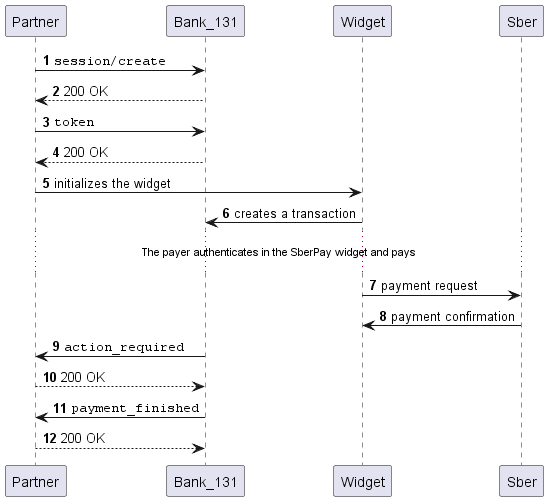
SberPay payments via our widget
You can accept payments via SberPay using our widget. No card details need to be entered to make a payment.
Step 1. Create a payment session
Send a request to create a payment session session/create. In the response, you will receive the session identifier.
Request example
curl -X POST \
  https://demo.bank131.ru/api/v1/session/create \
  -H 'Content-Type: application/json' \
  -H 'X-PARTNER-PROJECT: your_project_name' \
  -H 'X-PARTNER-SIGN: signature' \
  -d '{
    "amount_details": {
      "amount": 10000,
      "currency": "rub"
    },
    "metadata": "order123"
  }'
Step 2. Get a public token
Get a public token to initialize the widget. Send a request to Bank 131 to create a token (token) passing the widget type (sber_pay_widget). In the response, you will receive a public token.
For the first payment from a device, the payer needs to authorize. For subsequent payments up to 10,000 rubles inclusive, re-authorization is not required. To force authorization on each payment regardless of the amount, pass the payer's phone number (
phone) when calling thetokenmethod. The number will be automatically inserted into the widget, and the payer can change it if necessary.
Request example
curl -X POST \
  https://demo.bank131.ru/api/v1/token \
  -H 'Content-Type: application/json' \
  -H 'X-PARTNER-PROJECT: your_project_name' \
  -H 'X-PARTNER-SIGN: signature' \
  -d '{
    "sber_pay_widget": {
      "session_id": "ps_77872830",
      "phone": "79680000000",
      "return_url": "https://131.ru"
    }
  }'
Step 3. Initialize the widget on the site
Initialize the widget on the site using the public token obtained in the previous step.
Our widget creates a transaction, collects the data required to process it, and opens the widget for payment via SberPay.
The payer authorizes in the SberPay widget and makes the payment.
The payer has 20 minutes to complete the payment. If the payer does not pay within this time, the transaction will be automatically canceled with the
cancelledstatus.
After the payment, the payer returns to the URL specified in the return_url parameter.
Wait until the payer either confirms or cancels the payment.
Step 4. Wait for an action_required webhook
Wait for an action_required webhook from Bank 131. This means that the payer has started the payment via the SberPay widget.
Webhook example
curl -X POST \
  https://partner.ru \
  -H 'content-type: application/json' \
  -H 'X-PARTNER-SIGN: signature' \
  -d '{
    "type": "action_required",
    "session": {
      "id": "ps_77872830",
      "status": "in_progress",
      "created_at": "2026-08-18T06:58:02.250718Z",
      "updated_at": "2026-08-18T06:59:10.000000Z",
      "acquiring_payments": [{
        "id": "pm_17617410",
        "status": "pending",
        "created_at": "2026-08-18T06:59:05.000000Z",
        "customer": {
          "reference": "sberpay"
        },
        "payment_details": {
          "type": "internet_banking",
          "internet_banking": {
            "type": "sber_pay",
            "sber_pay": {
              "channel": "widget"
            }
          }
        },
        "amount_details": {
          "amount": 10000,
          "currency": "RUB"
        },
        "amounts": {},
        "customer_interaction": {
          "type": "inform",
          "inform": {
            "type": "notification",
            "notification": {
              "type": "sber_pay_widget",
              "sber_pay_widget": {
                "order_id": "019ff9be-7bbf-5fb2-1e7f-ef6dedfb7b5d"
              }
            }
          }
        }
      }],
      "actions": {
        "confirm": "2026-08-18T06:59:10.000000Z"
      }
    }
  }'
Step 5. Wait for a payment_finished webhook
Wait for a payment_finished webhook from Bank 131 with the payment results. The succeeded status means the payment was successful. If the status is failed, the payment failed.
Webhook example
curl -X POST \
  https://partner.ru \
  -H 'content-type: application/json' \
  -H 'X-PARTNER-SIGN: signature' \
  -d '{
    "type": "payment_finished",
    "session": {
      "id": "ps_77872830",
      "status": "accepted",
      "created_at": "2026-08-18T06:58:02.250718Z",
      "updated_at": "2026-08-18T07:08:04.356341Z",
      "acquiring_payments": [{
        "id": "pm_17617410",
        "status": "succeeded",
      "created_at": "2026-08-18T07:08:03.323479Z",
      "customer": {
        "reference": "sberpay"
      },
      "payment_details": {
        "type": "internet_banking",
        "internet_banking": {
          "type": "sber_pay",
          "sber_pay": {
            "channel": "widget"
          }
        }
      },
      "amount_details": {
        "amount": 10000,
        "currency": "RUB"
      },
        "amounts": {}
      }]
    }
  }'
Sequence diagram